
BLOGS > DECEMBER 15, 2020
BY CARRIE FRIDAY

My favorite activity to do with students in the library is taking them through STEAM stations that are tied to the content they’re learning in class. When offered a choice of hands-on activities, students are engaged and find learning so much fun. Plus, it’s an amazing way for them to show what they know. As we’ve adjusted how we teach, it’s been a challenge to figure out how I can still do these great activities with students in a safe way and to make sure that students learning both in person and at home still have lots of great options that can be done with a variety of materials.
Building Your Choice Board
Identifying Your Needs
You’ll want to make sure you have a clear objective in mind when building your choice boards. As you think through your objective and purpose, you need to consider the students too. Below are the questions I ask myself as I map out my choice board.
Once you’ve addressed the questions above and you know what resources you have available (maker materials, online tools, materials that could be found at home), you can start building your challenges and choices.
Map It Out
It can be as simple as you want. You should draw out how many boxes you want and what sizes each will be. Then, decide on a title and add directions. Some choice boards are like tic-tac-toe or bingo where students need to complete a column, row or diagonal line. Some choice boards offer students more options than others, so you may ask them to complete a certain number of tasks. It’s up to you.
Pick Your Platform
Once I’ve identified my objectives, materials and template, I start building. I build my choice boards in Google Slides and publish through Google Classroom. Previously, I used engineering sheets that students completed when we did rotating stations. I wanted something similar and found that using Google Slides is great! You could also use Microsoft Word or Google Drawing to create your choice boards.
With Google Slides, the students each get their own copy of the slides, and then they add a slide for each activity they complete. They can insert photos or screenshots, write reflections and submit their final product.
Repeat and Revise
Once I have one great template, it’s easy to build more. Simply copy the slide, change the background and adjust the challenges and activities based on the course and content. As I go through the instructions and expectations, I try to give my e-learners ideas for things they can find around their homes and how they would show us their work.
The students LOVE these activities and get so excited each time they come in and see a choice board pulled up on the screen. The really great thing is that choice boards can be adapted for any subject area and any set of available materials. They can also be used online, in person or a combination of the two.
Make Them ADA Compliant
There are some issues with using slides involving graphics to make them ADA compliant. There are some simple things you can do to make adjustments for this. I use Google Slides all the time and Google Support has some great tips for making things ADA compliant. To make slides compliant:
Also, be aware as you create that you should use hyperlinks and not just the web address, and be mindful of your text boxes as most screen readers read text boxes in the order they were created, not just left to right.
Examples of Choice Boards: Versatile for Every Subject
I started by building a choice board for the book The Bridge Home by Padma Venkatraman. Once I saw how well it worked, I knew I had a new go-to product to use with classes. Since then, I’ve created choice boards for algebra, a Spooky Stories unit for ELA, a Thanksgiving choice board, a winter-themed choice board, and I’m working on building one on space for our Grade 8 science classes.
Below are some choice boards I’ve created around different topics. You can see the different tasks and designs for each.
Here is a Thanksgiving choice board I used.
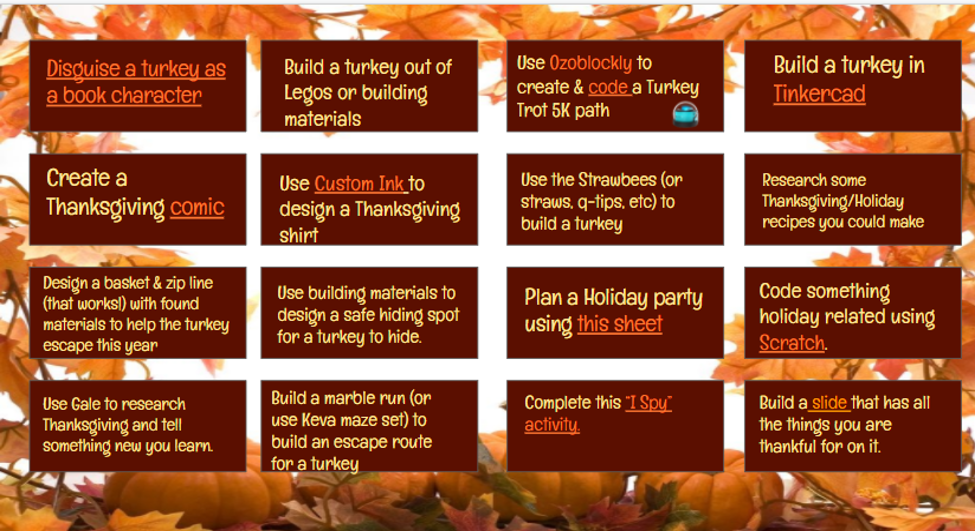
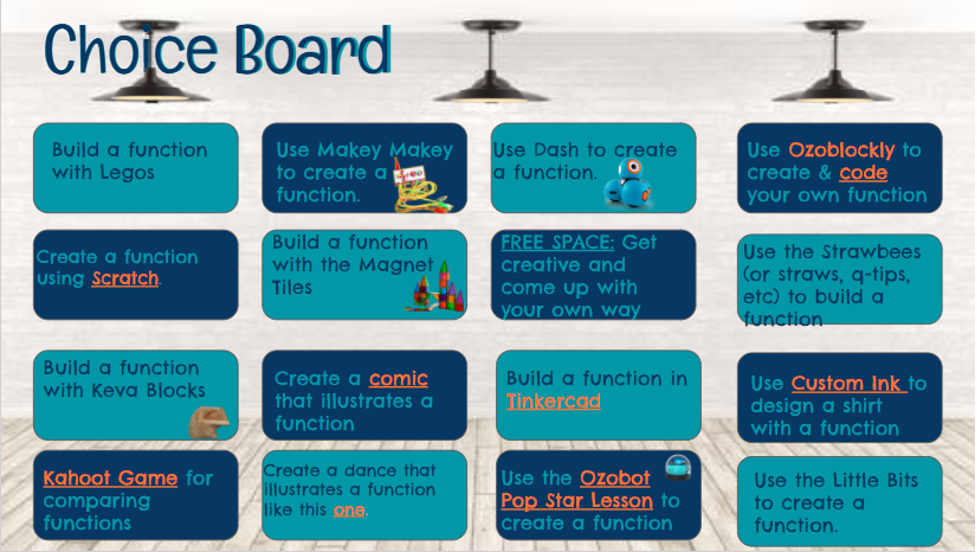
Choice boards can be used for any subject. Here is one I built for algebra on functions.
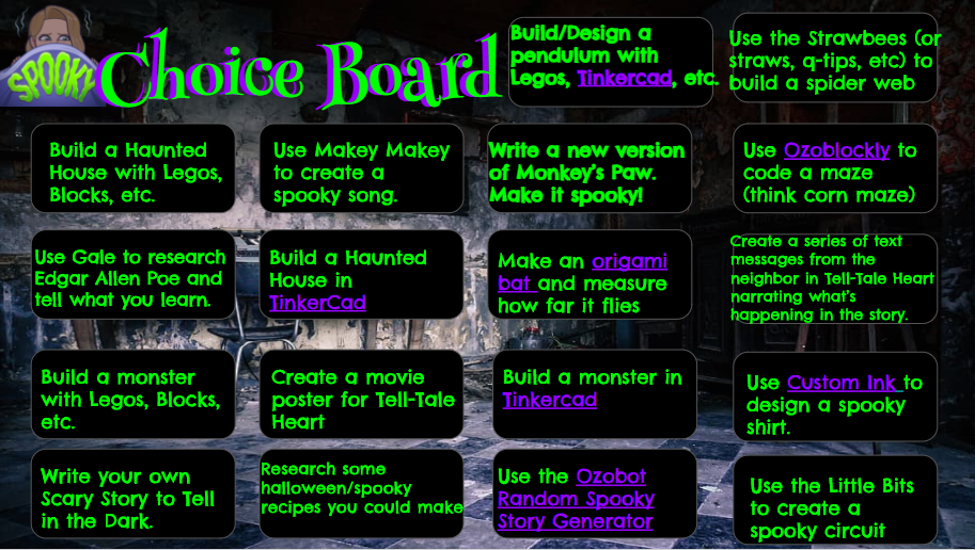
My favorite one so far has been the Spooky Story unit. The students LOVED making the Origami bats and flying them!
Shannon Miller also has some amazing choice boards here that are ready to use for many different areas.
Choice boards are great because they meet students where they are while still providing an engaging activity that really builds their critical thinking skills. If you have questions or would like to brainstorm some ideas with someone, please feel free to contact me! I’d love to help you.
We’d love to see your choice boards! You can tag me on Twitter or on Instagram, and don’t forget to tag Follett on Twitter and Instagram, too.
And check out a few of my other blogs:
Promoting Literacy and STEM During Distance Learning
Adapting the 20 Book Challenge for Elementary Students
Book Diversity in the Classroom and Library
Keeping Literacy Alive Through Book Clubs

CARRIE FRIDAY
Media Specialist
Southwest Middle School
Palm Bay, Florida
Carrie Friday is the Media Specialist at Southwest Middle School in Palm Bay, a 2018-2019 Teacher of the Year Finalist for Brevard Public Schools, and a 2019-2020 Space Coast Public Service Heavy Lifter award winner. She isn't afraid to take risks and will do just about anything to encourage the love of literacy in students and teachers. She is a co-founder of the #swms20bookchallenge and total YA author fangirl. Carrie is a Follett Community contributor and has presented best practices at the district level, FAME, AASL and FETC. Most recently, Mrs. Friday’s library program was awarded the designation of a Florida Power Library School by the Florida Department of Education. She believes in innovation, collaboration and the power of really good books.
She is also a wife to a rocket scientist and a mom to the sweetest two girls you'll ever meet. She loves Gilmore Girls, Pinterest, coffee, and porch swings. She is a proud graduate of Auburn University. War Eagle!
You can reach her through email at friday.carrie@brevardschools.org. Follow along with her adventures in the media center on Twitter or on Instagram.
How Public Libraries Can Inspire a New Generation of Readers
October 21, 2026
Public libraries have always played an important role in helping people discover books, ideas, and new perspectives. Today, that role is more important than ever.As children and teens face increasing competition for their attention from social media, streaming content, gaming,...
Read more
Still picturing us as a K-8 company? Here's what's changed...
October 20, 2026
If you know Follett Content from the elementary or middle school levels, you probably imagine picture books, early chapter books, and the middle grade series students couldn’t put down. That picture isn’t wrong. It’s just incomplete.
Read more
Introducing Follett List Notifications
October 16, 2026
Curated book lists for public library selectors – delivered to Titlewave, free, and reviewed by you before anything is ordered.
Read more
Shelf-Ready Services for Public Libraries: 5 Takeaways from Our Webinar
October 16, 2026
During our Shelf-Ready Services webinar, Trisha Vreeman, Custom Library Services Director, and Corrine Lagacy, Professional Services Manager, showed public library staff how shelf-ready services shorten the trip from delivery truck to shelf. Here's what they covered.
Read more
New Books for Librarians: 30+ Standout Titles from Four Publishers
October 16, 2026
Reader requests pile up, budgets stay tight, and new releases arrive faster than anyone can read them all. So, we brought four publishers together to do the sorting for you.
Read more
A Modern Classic: Building the Public Library Partnership for What Comes Next
October 12, 2026
Last month, Emily Henry announced the title of her next novel: Modern Classic, due out in April 2027. As a reader, I can already imagine the holds lists! But the title caught my attention for another reason: it’s a fitting...
Read more