
BLOGS > JANUARY 29, 2020
BY STACIA DIRKS

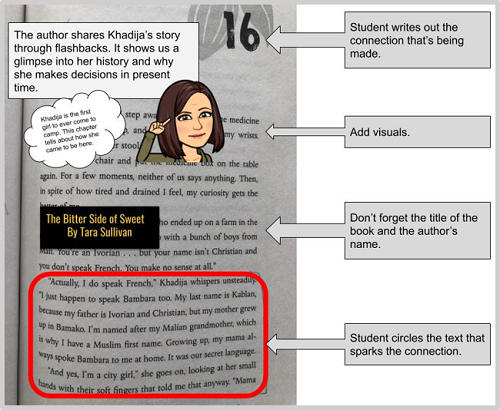
#2. Take a picture of a passage that connects in some way to the learning goal.
#3. Use markup tools to highlight, underline, or circle the part of the text you are connecting to.
#4. Create a text box with your personal thoughts about the connection you made.
#5. Add digital visuals including speech bubbles, emojis, stickers, Bitmojis, etc.
#6. Be sure to add the book title and author’s name.
#7. Share with your teachers and classmates!
Obviously, we aren’t going to ask them to open up SnapChat on their devices, so we need to be creative about where they can do this. Anything that allows a student to take a photo and mark it up will work. Here are a few ideas:
Don’t stop with ELA. Since its creation in 2016, there have been many offshoots of #BookSnaps.
What else could your students snap?
For more information on #BookSnaps, search the hashtag on Twitter and follow @TaraMartinEDU. Check out her YouTube playlist.
Happy snapping!
You’ll find more great articles, webinars and giveaways in The Scoop, Follett's bi-monthly classroom newsletter for teachers. Sign up today and receive a free eBook!
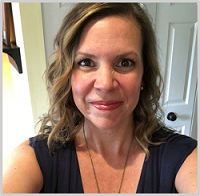
STACIA DIRKS
Stacia has worked in education for nearly 20 years in diverse K-5 classroom settings, as a classroom teacher, an instructional coach, and now as an instructional technology specialist for K-12. She holds a Master’s Degree in Differentiated Instruction from Concordia University. Her passion is providing equity for all students and embedding technology into curriculum to enhance 21st-century skills for students. She provides differentiated professional development to K-12 teachers for successful integration of technology with all content areas and structured curriculum.
Twitter: @staciadirks
More by Stacia Dirks
Give Students Choice with Hyperdocs
Breaking Out of the Ordinary: How to Create and Incorporate Breakouts
#BookSnaps: Get Social with Books
A Place for Every Reader: Supporting Literacy in NYC School Libraries
October 29, 2026
Help NYC students discover books they want to read. Explore practical ways to build school library collections that support student choice, access, and literacy.
Read more
tonies + Book Bundles for Libraries: Play, Print, and Early Literacy
October 22, 2026
How do you get a three-year-old excited about books when a screen is always within reach? Pair the stories kids already love with the print books that tell them.
Read more
Book Picks for Fall: The Two Bs' Top 15 (Plus a Few Bonus Books)
October 22, 2026
Laurie Bolt and Claire Bremner, Follett Content sales consultants and former school librarians in Virginia, read stacks of new releases every season and text each other about the ones they can't put down. In this blog post, they shared their...
Read more
An Author Interview with Doreen Cronin
October 22, 2026
Follett Content caught up with author Doreen Cronin to talk about her new book, her beloved characters, and how she finally found the nerve to drive through a car wash.
Read more
October 22, 2026
Introducing a new blog series from teacher librarian, international speaker, consultant and author Shannon McClintock Miller.
Read more
Library Spaces That Work for Every Student: Ideas from Shannon McClintock Miller
October 22, 2026
This fall, district teacher librarian Shannon McClintock Miller opened a brand-new library and walked us through how she designed it, and shared low-cost ideas that work in any space, new or not.
Read more